The Best Customer Feedback Tools for SaaS Teams in 2026

Customer feedback tools fall into five categories: feedback boards and portals, survey tools, in-app widgets, product analytics and session tools, and review sites. Most teams end up running two or three of them at once. Pick by where the feedback enters and where it needs to land. If your engineers run on Linear, Productlane is the all-in-one option: a feedback portal with upvoting, a public roadmap, a changelog, an in-app widget, and a support inbox living in one Linear-native tool, so requests captured anywhere become Linear issues your team ships. Plans open at $29 per seat each month on the annual option, and the AI agent runs on usage at roughly 79 cents a resolution. Below: what counts as a feedback tool, the categories explained, a comparison table of the tools worth shortlisting in 2026, and how to choose without ending up with five overlapping subscriptions.
Every SaaS team collects feedback. The question is whether it goes anywhere. A feature request mentioned in a support ticket, a frustrated comment in an NPS survey, a rage-click captured in a session recording: these are all feedback, and they all arrive in different tools that rarely talk to each other. Choosing customer feedback tools is really a question of which signals you want to capture and how short the path is from signal to a shipped change.
This guide maps the landscape. We define what a customer feedback tool is, group the market into the five categories that actually matter, shortlist the tools worth evaluating in 2026 with a comparison table, and give you a way to choose that keeps your stack from sprawling.
What counts as a customer feedback tool
A customer feedback tool is any software whose job is to capture what customers think, want, or struggle with, and route it somewhere your team can act on it. That definition is broad on purpose: feedback arrives through many surfaces, and the tools that capture it look quite different from each other.
The useful distinction is between tools that capture asked-for feedback (surveys, feedback boards, a request you typed into a widget) and tools that capture observed feedback (session recordings, heatmaps, behavioral analytics). Both are signal. A team that only watches behavior misses the why; a team that only reads surveys misses what people actually do. Most mature feedback programs run at least one tool from each side.
The second distinction is what happens after capture. A feedback tool that ends at a dashboard leaves the hard part (deciding and shipping) to a separate system. A feedback tool wired into your issue tracker closes the loop, so a request becomes a ticket, a ticket becomes shipped work, and the customer hears back when it lands.
The five categories of customer feedback tools
Vendors blur these lines, but every tool sits mostly in one of these five buckets. Knowing which bucket you are shopping in keeps a sales demo from talking you into a category you did not need.
1. Feedback boards and portals
A public or private space where customers post feature requests, upvote each other's ideas, and watch a roadmap. The value is aggregation: ten customers asking for the same thing show up as one request with ten votes, which makes prioritization concrete. The strongest of these tie a request to your issue tracker and tell the customer when it ships. Productlane, Canny, and Featurebase live here. See our guide to feature request tracking for the workflow behind a board.
2. Survey tools
Tools that ask a structured question and collect structured answers: NPS, CSAT, CES, onboarding surveys, churn surveys. Good for measuring sentiment over time and for reaching customers who would never post on a board. Typeform and SurveyMonkey are the general-purpose options; in-product survey tools like Sprig fire questions at the moment a behavior happens. Our guide to customer feedback surveys covers the question design.
3. In-app widgets
A widget embedded in your product that lets a user send feedback, report a bug, or ask a question without leaving the page. The advantage is context: the widget can attach the URL, the browser, and the user record automatically. Productlane ships an in-app widget in 47 languages; most feedback portals and support platforms include some form of widget.
4. Product analytics and session tools
The observed-feedback side. Session recordings, heatmaps, funnel analytics, and click maps show what customers do rather than what they say. Hotjar and FullStory dominate here, with PostHog and Amplitude covering the analytics end. These tools surface friction you would never hear about in a survey, because most users abandon quietly rather than complain.
5. Review sites
G2, Capterra, and Trustpilot collect public reviews. The feedback is unsolicited and shaped for an audience, so it skews toward extremes, but it is honest about how you stack up against competitors and it doubles as social proof. Worth monitoring, rarely worth treating as a primary feedback channel.
The best customer feedback tools in 2026
A shortlist across all five categories, with a comparison table first and a short take on each below. We have flagged which category each tool leads in so you can match it to the signal you are trying to capture.
| Tool | Category | Best for | Starting price |
|---|---|---|---|
| Productlane | All-in-one (Linear-native) | Linear teams wanting portal, roadmap, changelog, and support in one tool | From $29 / seat / mo |
| Canny | Feedback board | Standalone request boards | Free tier; paid from $79 / mo |
| Featurebase | Feedback board | Boards plus changelog on a budget | Free tier; paid from $49 / mo |
| Pylon | Support + feedback | Slack-first B2B teams | Custom |
| Typeform | Survey | Branded standalone surveys | From $25 / mo |
| Sprig | In-product survey | Targeted in-app micro-surveys | Free tier; paid custom |
| Hotjar | Session + analytics | Heatmaps and recordings | Free tier; paid from $32 / mo |
| PostHog | Product analytics | Engineering-led analytics | Free tier; usage-based |
| G2 | Review site | Public reviews and social proof | Free to monitor |
A longer take on each, grouped by the category it leads in.
Productlane
The all-in-one feedback tool for teams on Linear. A public feedback portal with upvoting, a public roadmap, a changelog, an in-app widget in 47 languages, and a support inbox all live in the same workspace, so the surfaces other teams stitch together from three vendors arrive as one tool. The spine is Linear: customer tickets link bidirectionally to Linear issues, the AI files scoped issues from conversations, and when a linked issue ships, Productlane auto-drafts the closing reply so the customer who asked hears back. The AI agent handles around one in three incoming conversations on its own (billed per resolution, about 79 cents each) and drafts replies on most of the rest. Strongest fit for B2B SaaS teams who want one Linear-native home for feedback, support, and the public surfaces customers see. Seats start at $29 a month on the yearly plan.
Canny
The best-known standalone feedback board. Clean public boards, upvoting, a roadmap, and a changelog, with integrations into the usual issue trackers. A solid pick if all you want is a dedicated request board and you are happy to run your support and roadmap elsewhere. We cover where teams look past it in our Canny alternatives piece. Paid plans start around $79 per month.
Featurebase
A newer feedback board that bundles boards, a changelog, and a help center at a lower price point than Canny. Good fit for smaller teams who want the board-plus-changelog combination without the larger vendor's cost. The integrations and AI story are thinner than the platform tools, and it sits beside your support stack rather than inside it.
Pylon
A Slack-first support platform with feedback capture built in. The fit is strong when your B2B customers talk to you in Slack Connect channels and you want requests captured from those conversations. Customer-facing surfaces like a public portal and changelog are thinner than the dedicated portal tools, and pricing is custom.
Typeform
The polished, branded survey tool. One-question-at-a-time forms that feel friendly and lift completion rates, with logic branching and a large template library. Reach for it when you want a standalone survey that lives outside the product (post-purchase, churn, research recruiting). It does not capture in-product behavior, so it pairs with an in-app tool rather than replacing one. From $25 per month.
Sprig
In-product micro-surveys that fire at the moment a behavior happens: after a user hits a paywall, completes onboarding, or abandons a flow. The targeting is the value, because the answer arrives with the context that triggered it. Best as a complement to a feedback board, not a replacement; it measures sentiment around specific events rather than collecting open feature requests.
Hotjar
The default for observed feedback. Heatmaps, session recordings, and on-page feedback widgets show where users hesitate, rage-click, or drop off. Pairs naturally with a survey tool: Hotjar tells you where the friction is, a survey tells you why. From $32 per month, with a free tier for low-traffic sites.
PostHog
An engineering-led product analytics suite that bundles event analytics, session replay, feature flags, and surveys under one usage-based bill. The right pick when your team is technical, wants to self-host or own the data, and prefers one analytics platform over a stack of point tools. Less suited to a non-technical team that wants a polished public feedback board.
G2
The review site to monitor first. Public reviews skew toward extremes and are written for an audience, so treat them as competitive signal and social proof rather than a primary feedback channel. Free to watch; the paid tiers are a marketing spend, not a feedback spend.
How to choose customer feedback tools
The mistake most teams make is buying by category instead of by workflow, which is how you end up paying for a board, a survey tool, a widget, and an analytics suite that all hold pieces of the same customer's story. Four questions narrow the field fast.
Where does feedback enter today?
Map the channels your customers already use: support tickets, Slack, in-app messages, sales calls. Buy tools that capture feedback where it already arrives. A beautiful public board sits empty if your customers only ever email you.
Where does feedback need to land?
If a request has to become engineering work, the tool should write to your issue tracker. A feedback tool that ends at a dashboard hands the decision and the build to a separate system, and the customer rarely hears back. Tools wired into Linear, Jira, or GitHub keep the path from request to shipped change short.
Asked-for or observed?
Decide whether you need to know what customers say, what they do, or both. Boards and surveys cover what they say; session and analytics tools cover what they do. Most teams want one from each side, wired so the two views sit next to the same customer record.
How many tools can you actually run?
Every extra tool is another login, another integration to maintain, and another place feedback goes to be forgotten. Favor a platform that covers two or three categories well over four point tools that each cover one. Cutting the number of tools usually buys you more than any single tool choice.
Where Productlane fits in a feedback stack
Productlane covers three of the five categories in one Linear-native tool, which is what lets a team retire a board vendor, a changelog tool, and an in-app widget at the same time. Because the same workspace also runs the support inbox, feedback that arrives in a ticket lands beside the portal and roadmap rather than in a separate silo. The Linear integration is what makes all of it move rather than pile up.
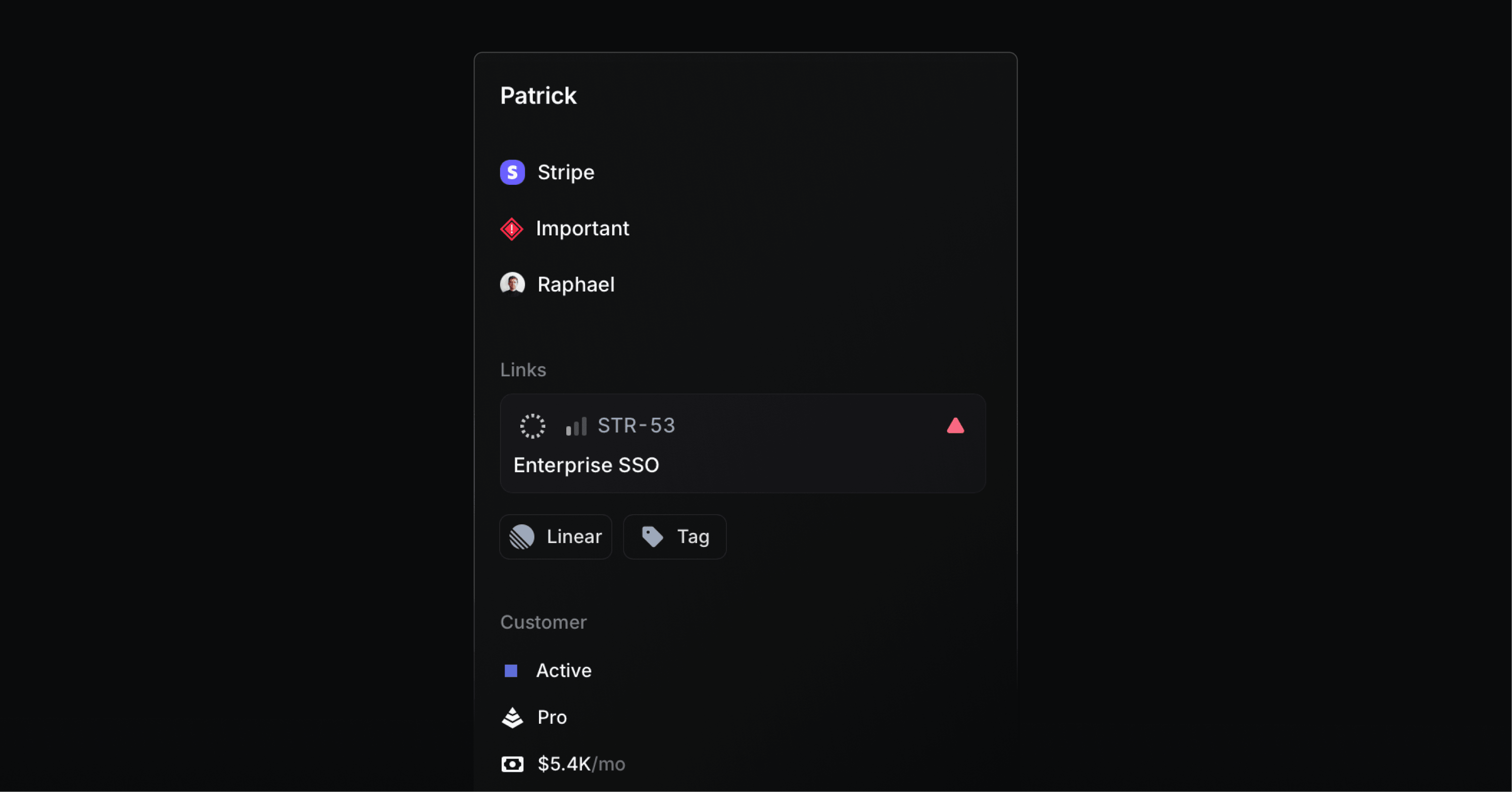
A request captured in Productlane links to the Linear issue your engineers are already working on.
A portal, roadmap, and changelog in one tool
Customers post and upvote requests on a public support portal, watch a public roadmap, and read the changelog from the same workspace. The three surfaces share one source of truth, so a request promoted to the roadmap and shipped to the changelog never falls out of sync.
Feedback becomes a Linear issue
Every request can become a Linear issue in one keystroke, bidirectionally synced. The AI agent files properly scoped issues from incoming conversations, and when the linked issue ships, Productlane auto-drafts the reply that tells the customer it landed. Feedback that would otherwise sit in a dashboard turns into shipped work with the loop closed.
Support and feedback share an inbox
The AI support agent closes around one in three incoming conversations on its own (charged per resolution, roughly 79 cents apiece) and drafts replies on the rest, and the feedback buried inside those conversations gets captured in the same place. The inbox runs on the Zero sync engine, so every keystroke lands in under 100ms even on large workspaces.
Frequently asked questions about customer feedback tools
Customer feedback tools are software that captures what customers think, want, or struggle with, and routes it somewhere your team can act on it. They fall into five categories: feedback boards and portals, survey tools, in-app widgets, product analytics and session tools, and review sites. Most teams run two or three at once.
A feedback board collects open-ended requests that customers post and upvote, which is good for surfacing what to build next. A survey tool asks a structured question (NPS, CSAT, onboarding) and collects structured answers, which is good for measuring sentiment over time and reaching customers who would never post on a board. They capture different signals and most teams use both.
Not always. Surveys and feedback boards capture what customers say; analytics and session tools capture what they do. A platform that combines a feedback portal, a widget, and a changelog can cover the asked-for side in one tool, leaving you to add a single analytics or session tool for the observed side. Favor consolidation over four point tools that each hold one piece of the customer's story.
For B2B SaaS specifically, the relevant question is whether feedback turns into shipped work. Productlane fits teams on Linear because requests become Linear issues and customers hear back when they ship. Canny and Featurebase are strong standalone boards, Pylon fits Slack-first teams, Typeform and Sprig cover surveys, and Hotjar covers observed behavior. Pick by where your customers already give feedback and where it needs to land.
Yes. Canny, Featurebase, Sprig, Hotjar, and PostHog all offer free tiers, and G2 is free to monitor. Free tiers usually cap volume, integrations, or branding control. They are a good way to validate a category before committing, but most growing B2B SaaS teams move to a paid plan once feedback volume and integration needs increase.
The strongest tools let you promote a popular request to a public roadmap and then to a changelog when it ships, all from one source of truth. Tools wired into an issue tracker like Linear go a step further: the request becomes engineering work, and the customer who asked gets a reply when the linked issue ships, closing the loop automatically.
Two or three is the sweet spot for most teams: one platform that covers boards, portal, and changelog, one survey tool, and optionally one session or analytics tool. Beyond that, the cost is not the subscription but the fragmentation, because feedback split across many tools is feedback nobody acts on. Consolidate where you can.
Pick the feedback tools that turn signal into shipped product
The best feedback stack is the one your team actually acts on. Start from where feedback already enters and where it needs to land, pick one tool per signal you care about, and consolidate the rest. A board nobody reads and a survey nobody acts on cost more than the subscription.
For B2B SaaS teams whose engineers live in Linear, Productlane is the all-in-one choice: a feedback portal with upvoting, a public roadmap, a changelog, an in-app widget in 47 languages, and an AI support agent in a single Linear-native tool. Feedback captured anywhere turns into Linear issues, customers hear back when their request ships, and the AI agent runs on usage at about 79 cents per resolution. Seats begin at $29 a month on the annual plan.
You can try Productlane for free or see pricing. If you are comparing feedback boards specifically, read our Canny alternatives guide next.